Instagram is a social networking platform that prefers visual content over textual. This feature distinguishes it from other social platforms and makes it the best way to promote your business/ account in 2022. But what if one regular post is insufficient – and you have additional stuff to share? Yes, by that we mean Instagram carousel posts.
Instagram has released lots of new features throughout the years. These features allow you to personalize your feed and enhance interaction. Stories, IGTV, and Reels should all be part of your Instagram feed. But the Instagram carousel feature is one of the simplest things to employ to boost engagement.

Carousels on Instagram have the best engagement rate compared to any other post category, although they only account for 19% of Instagram content.
Ways To Use Instagram Carousel Posts In Your Marketing
Instagram Carousels should be used by everyone, especially companies, to engage their audience. Furthermore, diversifying your content types is an excellent strategy to make the Instagram algorithm work in your favor. You’re missing out on a great feature if you omit Carousels in your marketing strategy!
An Instagram carousel is a collection of images displayed in a single post. It is excellent for conveying stories that may necessitate the usage of more than one picture.
You might, for example, use an Instagram carousel to display before and after photos of a DIY project, an outfit, or a place. You might provide a recipe with step-by-step photos, or you may emphasize various parts of a recent vacation.
How To Design Beautiful Instagram Carousels
Users can cycle between the several photos that make up the carousel by swiping left and right. The same feature is available as an ad format on Facebook.
On the other hand, an Instagram carousel isn’t simply for images. On your carousel post, you can include videos or a combination of pictures and videos. Long panoramic photographs may also be broken down and added to an Instagram carousel.
People in the social media sphere frequently inquire, “Do carousels outperform other posts?” In a nutshell, the answer is yes. Let’s have a look at the research behind this.
How To Create Instagram Carousel Ads
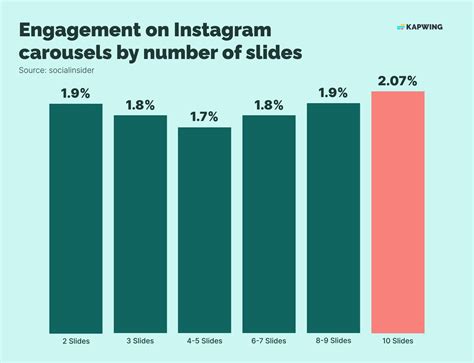
According to studies, advising customers to keep swiping left to read the carousel post can improve interaction by 1.83 percent to 2 percent. Carousel posts on Instagram have 1.4x the reach of a typical post. By including many slides, visitors can access more content on a single post.
If your company conducts a seminar or conference, you can post plenty of images showing your crew having fun and learning at the event. Assume you own a cosmetics firm and want to showcase your new lipstick ranges. An innovative approach would be friendly to offer a carousel post with each new lipstick color introduced on a new slide.
Before creating your post, you need to know about the optimum sizes and formats for your images and videos. Instagram carousels, like any other post, have standard dimensions. Here are the various sizes for pictures and videos in a carousel post.
How To Create Instagram Carousel: 11 Examples To Spark New Ideas
When it comes to making a compelling Instagram carousel, the last thing you want to do is just select a collection of photographs. Consider the story you want to convey, how the images will work together and your caption for the best results. Here are the essential steps for creating an eye-catching Instagram carousel.
Your Instagram carousel, like any other piece of content, should begin with a basic concept. Remember that this fundamental concept must be helpful or amusing to your intended audience (bonus points if it is both valuable and entertaining).
Divide it into subsections if your concept is too explanatory for a single carousel post. Each part can be used to create a unique Instagram carousel post.
How To Create Instagram Carousel — Will Khoury
If you’ve already answered the preceding point’s questions and chosen a topic, develop a script for your Instagram carousel post. We generally divide the outline into three different sections:
It is the first and most significant slide in your post. We also have always been advised, “Never judge a book by its cover.”
However, it is impossible not to judge a book by its cover or a person by his or her clothing. You cannot undo billions of years of human evolution in a split second.

How To Make A Creative Carousel Post For Your Instagram Feed (+ Free Templates)
Your followers will judge your Instagram carousel based on the first slide. Nobody will mind checking out the rest of the carousel if the initial slide does not attract them.
A good headline must pique the interest of someone browsing through their feed. It should entice readers to continue reading through the remaining of your Instagram carousel by sliding left.
After you’ve hooked your audience’s interest with the first slide, your next aim is to get them to swipe left. Each successive slide’s purpose is to lead them to the next slide.
Ways To Increase Engagement With Instagram Carousel Posts
The correct call to action will affect how your visitors interact with your content. Rather than simply hoping that your audience would do anything, you should tell them what to do.
After scrolling through your Instagram carousel, your audience will arrive at your CTA (the last slide). Like the hook (on the first slide), the CTA slide is critical to your engagement.
Although the CTA may not appear to be crucial, optimizing it is one of the most critical growth hacks in Instagram marketing.
An Easy Guide To Create A Seamless Instagram Carousel With Canva
If you already have a defined brand guideline, your half work is done. The names of your typefaces, brand colors, and design rules should all be included in your brand guideline. If you don’t already have a brand guideline, you must create one from the start.
Make sure you have a brand guideline in place before you design your Instagram carousel. If it sounds too complicated, here are a few things you should know:

After you’ve decided on your brand’s colors, fonts, and logos, you should start creating your Carousel. To develop an outline for your Instagram carousel post, you can utilize specific online/offline design software.
Instagram Carousels: 7 Design Tips You Need
After you’ve finished creating your Instagram carousel, double-check it for errors and alignment mistakes. Proofread your content to ensure that there are no spelling or grammatical issues. Check that the visuals and text on your posts are consistently aligned.
You overlooked the other two critical components of an Instagram carousel. Actually, you missed the two most vital components of each Instagram post: captions and hashtags.
Captions help you explain your concept even more clearly. But that isn’t the only reason you should add captions in your posts. Here are some other ways to use captions in an Instagram carousel post:
Why You Should Use Instagram Carousels + 10 Ideas To Get You Started
The hashtag is the final component of the ideal Instagram carousel post. According to the same engagement analysis, the typical post on Instagram featured 6.93 hashtags. This was a significant decline from the average amount of hashtags/posts the previous year. This analysis also discovered that half of all posts featured one or no hashtags.
This provides you with a fantastic opportunity to utilize hashtags fully. Hashtags allow you to reach new audiences and expand the reach of your Instagram carousel post.
With the free Instagram hashtag generator tool by , you can easily extract the most popular and trendy Instagram hashtags that will boost your engagement.
Twitter Carousel Examples • Organic And Ad Carousels
Don’t expect to get a lot of likes by just posting 10 relevant images in a single post. Use Instagram Carousels to express yourself. Also, don’t forget to include videos carousels that include both photos and videos as they have the best engagement rate of any post type on the app. Experiment with these content ideas to observe how your target audience reacts.

Make it worthwhile for users to scroll through your Instagram Carousel posts. While you’re at it, utilize your caption to tell users to swipe left. Studies show that posts containing the phrase “swipe left” receive more interaction than those without.
Prompts like “swipe to find out more” or “swipe for a surprise” may seem overly apparent, yet they work. Some Instagram accounts exploit the promise of a revelation to get users to connect with their posts.
Introducing Auto Post For Carousels To Instagram
Display your makeovers. Rather than incorporating 2 images in one, you can share your high-quality before and after images using Instagram Carousels. Before-and-after posts are helpful in a range of businesses, from beauty salons to home improvement projects. Instagram Carousels are a terrific method to demonstrate how your product or service improves something.
Consider changing the order of before and after photographs when posting this type of content, i.e., end result photos first, then prior images. It’s always great to get people to follow you on Instagram with visually appealing content.
Instagram captions are helpful for long-form text and explanations, but they lack the visual impact. When you have intriguing information to present, create textual pictures and publish them in an Instagram Carousel post.
How To Create An Instagram Carousel In Photoshop
No matter how attractive the statistics or data points are, you’ll have difficulty convincing folks to read through your caption. Try using basic visual pictures to highlight a few crucial topics.
Since Instagram is a visual medium, photos and videos are the most excellent methods to keep users from scrolling past your post. When a person’s attention is drawn to a picture, they are more inclined to read your caption or browse your profile page for further information.
Instagram Carousels are your buddy if your how-to material is too long for an Instagram Reel and


0 Comments
Posting Komentar